


Velux Remote Control Options Explained: Which One Suits Your Home?

Updated: Aug 10

If you have electric or solar-powered Velux roof windows, blinds, or shutters in your home, you need a way to operate them. The good news is there are four Velux remote control options available, from a basic wall switch to full smart home automation with sensors. Each suits a different household and budget.
We are a Velux Certified Installer based in Sheffield, serving homeowners across South Yorkshire and beyond. We fit and configure these systems regularly, so we know exactly how each one performs in real homes. Here is our honest, practical guide to help you choose.
The Four Velux Remote Control Options at a Glance

Feature | Standard Wall Switch (KLI) | Velux Touch (KLR 300) | Velux App Control (KIG 300) | Velux Active (KIX 300) |
|---|---|---|---|---|
What it controls
| A single powered item (one window or one blind). | Multiple devices, grouped by room or type.
| All Velux products via your smartphone or tablet. | All Velux products, plus automatic climate-based adjustments. |
Ease of use | Simple. Press a button. | Touchscreen. Group rooms or product types. | App-based. Scheduling, automation, and voice control. | Fully automatic. Sensors adjust your home for you. |
Wi-Fi required? | No. | No. | Yes. Gateway connects to your router. | Yes. Gateway connects to your router. |
Smart home compatible? | No. | No. | Yes. Apple HomeKit and Google Assistant. | Yes. Apple HomeKit and Google Assistant. |
Cost | Included free with every powered product. | Mid-range. One unit covers multiple products. | Higher upfront for the gateway, but one covers the whole home. | Highest upfront. Includes gateway and climate sensor. |
Best for | Homeowners with one or two powered items who want simplicity. | Homes with multiple Velux products wanting centralised control. | Homeowners wanting remote access, scheduling, and voice control. | Homeowners wanting a fully automated healthy home climate. |
Option 1: Standard Velux Wall Switch (KLI 310/311/312/313)
This is the remote that arrives with every powered Velux product. It controls one item at a time, requires no setup, and is designed to be as straightforward as possible. One button opens, one button closes.
If you have a single Integra roof window or a powered blind, this is all you need. It mounts on the wall or sits in a drawer, and it simply works. No Wi-Fi, no app, no configuration.
Pros:
Included free with every powered Velux product
Zero setup required
Reliable and simple to use
No Wi-Fi or internet connection needed
Cons:
Controls only one product per switch
No scheduling or automation
Multiple products means multiple remotes, which gets cluttered
No remote access when away from home
Our take: Perfect if you have one or two powered items and you value simplicity above all else. For anything more, you will quickly want a better solution.
Option 2: Velux Touch (KLR 300)
For homes with several Velux products, the Velux Touch brings everything together on one device. You can group windows and blinds by room, operate them together, and manage up to 200 products from a single touchscreen remote.
This is a practical step up if you have, for example, multiple roof windows across a loft conversion with blinds on each. Rather than juggling several individual wall switches, one device handles the lot. It also includes a 15-minute ventilation timer, so you can air out a room and the window closes automatically.
Many homeowners in Sheffield and South Yorkshire choose this option after a loft conversion, where three or four new Velux windows and blinds suddenly need managing from one place.
Pros:
One remote controls all Velux products in the home (up to 200)
Group by room for quick, simultaneous control
Built-in ventilation timer
No Wi-Fi required
Replaces older KLR 200 and KLR 100 remotes directly
Cons:
No remote access when away from home
No voice control or smart home integration
No scheduling beyond the basic timer
Additional cost on top of the included wall switches
Our take: The best balance of simplicity and centralised control. If you do not need smart home features or remote access, this is the one we recommend most often for loft conversions with multiple products.
Option 3: Velux App Control (KIG 300): Control Your Roof Windows From Your Phone
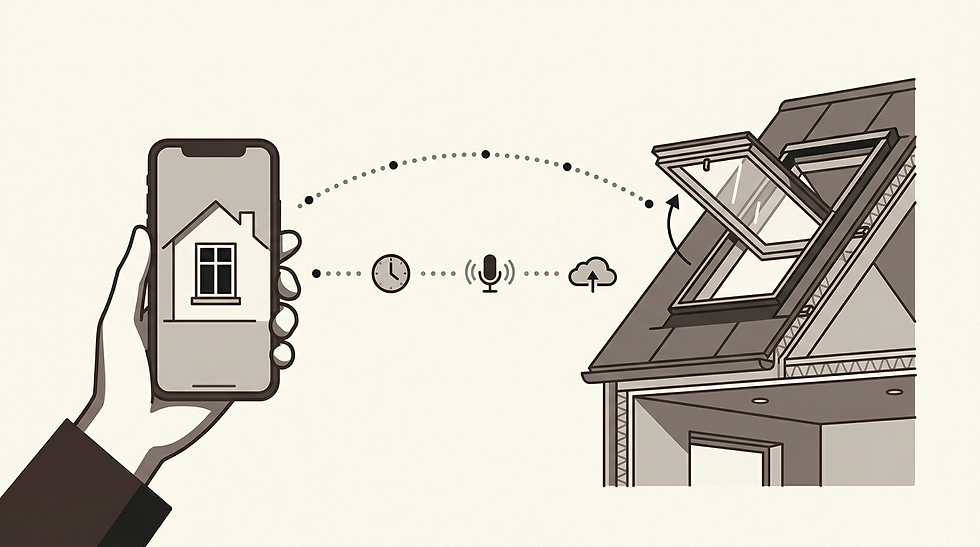
This is where things get genuinely useful for modern households. The Velux App Control uses a small gateway (the KIG 300) plugged into your home router. Once set up, you control every powered Velux product from your phone, wherever you are in the world.
What this means in practice:
Left the house and the weather turns? Close your Velux windows from your phone.
Want fresh air first thing? Schedule your windows to open at 6am.
On holiday? Check and control everything remotely for peace of mind.
Multiple people at home? Share app access with the whole household.
Prefer hands-free? Use voice commands through Apple HomeKit or Google Assistant.
Only one gateway is needed per home. It is a one-off purchase that covers every Velux product in the property, making it a simple, long-term investment in comfort and control.
Pros:
Control all Velux products from anywhere via your smartphone
Schedule windows and blinds to open and close automatically
Voice control with Apple HomeKit and Google Assistant
Share access with the whole household
One gateway covers the entire home
Cons:
Requires a stable Wi-Fi connection and home internet
Higher upfront cost than the Velux Touch
Gateway must remain plugged into your router
If your internet goes down, remote access is lost (local switches still work)
Our take: For homeowners who travel regularly, work away, or simply value knowing their home is secure, this is the clear choice. It is also the natural pick if you already use Apple HomeKit or Google Home for other devices.
Option 4: Velux Active with Netatmo (KIX 300): Smart Home Climate Control
Velux Active is the most advanced option. It includes everything the App Control offers, plus an indoor climate sensor that monitors temperature, humidity, and CO2 levels in your rooms. Based on those readings, it automatically opens and closes your roof windows, blinds, and shutters to maintain a healthy indoor climate.
This is a genuine smart home system. It does not just let you control your Velux products remotely; it makes decisions for you. If CO2 levels rise in a bedroom overnight, the window opens automatically to ventilate. If a room is overheating on a summer afternoon, blinds close and windows adjust without you lifting a finger.
The starter kit (KIX 300) includes the gateway, one indoor climate sensor, and a departure switch. You can add extra sensors for additional rooms.
Pros:
Fully automatic ventilation and heat protection based on real sensor data
Monitors temperature, humidity, and CO2 in each room
All the app features: remote access, scheduling, voice control
Works with Apple HomeKit and Google Assistant
Departure switch closes everything when you leave the house
Healthier indoor air quality without thinking about it
Cons:
Highest upfront cost of all options
Requires Wi-Fi and internet connection
Additional sensors needed for each room you want monitored
Some homeowners find the automatic adjustments unexpected at first
More components to set up initially
Our take: If you want your home to manage itself and you care about air quality and comfort, this is the premium choice. Particularly suited to families with young children, or homes where loft bedrooms can overheat in summer. We see this chosen most often in larger loft conversions across Sheffield and South Yorkshire where heat management on the top floor genuinely matters.
Upgrading From an Older Velux Remote
If you have an older Velux remote (KLR 100, KLR 200, or the original rectangular wall switches), you can upgrade to any of the options above. The KLR 300 directly replaces all previous touchscreen remotes, and the KIG 300 or KIX 300 gateways work with any Velux product fitted with io-homecontrol technology (2005 onwards).
Not sure which remote you currently have, or whether your windows are compatible? We have a separate guide on identifying your Velux remote and troubleshooting issues: Velux remote control not working?

Why Work With a Velux Certified Installer in Sheffield?
Whichever control option you choose, correct installation is what makes everything work properly, and keeps working for years. This applies whether you are fitting new windows, replacing old ones, adding powered blinds, or upgrading to app-based control.
Not every roofer or builder carries the same level of Velux product knowledge. Here is why choosing a certified installer matters.
Trained directly by Velux. Authorised installers complete Velux’s own training on installation methods, flashing systems, and electrical integration. They know the correct procedures for every product in the range.
Installed to manufacturer standards. Correct flashing details, proper insulation, and accurate wiring for powered elements. This protects your home from leaks and ensures everything operates as it should.
Your warranty stays intact. Velux products carry manufacturer guarantees of up to 10 years on windows and installation products. Incorrect fitting can void these. A certified installer protects that cover.
Assessed annually to TrustMark standards. In the UK, Velux Certified Installers are checked each year against the government-endorsed TrustMark scheme. This includes on-site inspections, trading history checks, and verified customer references.
Specialist advice included. From window sizing and glazing specifications to configuring your remote control setup, an authorised installer guides you through the options and makes sure everything integrates properly.
Right first time. No call-backs, no leaks, no voided warranties. When products and installer are both Velux-certified, you know the job is done properly.
About Milestone Homes and Lofts
We are a Velux Certified Installer based in Sheffield, with over 20 years of experience fitting Velux products across South Yorkshire. We know these products inside out, and we fit them to the standard they are designed for.
We are also a Prestige Award winner for Loft Conversion Specialist of the Year, four consecutive years running (2022 to 2025). Our team has been in the industry for over 40 years.
If you are planning a loft conversion, window replacement, or simply want to upgrade your Velux controls, we are happy to talk you through the options. No pressure, just clear advice from a specialist team.
Call us: 0114 437 2022 | Email: info@milestonehomes.co.uk
Which Velux Remote Control Option is Right For You?
The honest answer depends on how many Velux products you have, how much flexibility you want, and whether smart home integration matters to you.
One or two powered items and you value simplicity? The standard wall switch is all you need, and it is included free.
Several Velux products across different rooms? The Velux Touch (KLR 300) brings centralised, room-by-room control without needing Wi-Fi.
Want remote access, scheduling, and voice control from your phone? The Velux App Control with the KIG 300 gateway is the one to choose.
Want your home to manage its own climate automatically? Velux Active with Netatmo (KIX 300) adds sensors and automation on top of full app control.
If you are unsure, get in touch. We will look at what you have (or what you are planning) and recommend the option that actually fits your home and lifestyle.

Frequently Asked Questions
Can I control my Velux windows from my phone?
Yes. With Velux App Control (KIG 300) or Velux Active (KIX 300), you can open, close, and schedule your roof windows, blinds, and shutters from anywhere using the free Velux App on iOS or Android.Yes. With Velux App Control (KIG 300) or Velux Active (KIX 300), you can open, close, and schedule your roof windows, blinds, and shutters from anywhere using the free Velux App on iOS or Android.
Do I need Wi-Fi for my Velux remote control?
Not for the standard wall switch or the Velux Touch. Both work on the io-homecontrol radio frequency with no internet needed. The App Control and Velux Active do require Wi-Fi for remote access and smart features.
Can I upgrade my old Velux remote to the KLR 300?
Yes. The KLR 300 directly replaces the older KLR 200, KLR 100, and original rectangular wall switches. Products need to be re-paired, but the process is straightforward. If you need help, we can configure this as part of a service visit.
Does Velux work with Google Home or Alexa?
Velux App Control and Velux Active work with Google Assistant and Apple HomeKit. Amazon Alexa is not natively supported by Velux at this time, though workarounds exist through third-party smart home platforms.
How many products can the Velux Touch control?
Up to 200 products in total, with a maximum of 99 displayed per category.
Is Velux Active worth it?
If you have multiple Velux products and you care about air quality, temperature management, or hands-free automation, yes. It is particularly valuable in loft bedrooms that can overheat in summer, which is common in Sheffield-area homes with south-facing roof windows.
Can I get a Velux remote control fitted in Sheffield or South Yorkshire?
Yes. We are a Velux Certified Installer based in Sheffield and we cover the whole of South Yorkshire and surrounding areas. We supply, fit, and configure all Velux control options as part of new installations, replacements or upgrades to existing setups.
Still can't find what your looking for?
No problem we are here to help, tap the button below to get to our contact page and either use the online form, drop us an email or give us a call.
This guide is written and maintained by Milestone Homes and Lofts, a Velux Certified Installer based in Sheffield, South Yorkshire.


Comments